Creating a Master Post
Mar. 27th, 2018 08:53 am![[personal profile]](https://www.dreamwidth.org/img/silk/identity/user.png) tdbk_member posting in
tdbk_member posting in ![[community profile]](https://www.dreamwidth.org/img/silk/identity/community.png) tdbk_bb
tdbk_bbWhat is a Master Post, and how do I create one?
A masterpost is a single posting promoting your joint project. It will include links to the writer and artists respective posting sites, as well as include any visual representation of their project (banner, icon, thumbnail) that they wish to include.
IMPORTANT. You will need a dreamwidth account in order to post directly to the tdbk_bb community. If you do not have an account, please log in with the username and password provided in the update email.
We do not foresee any complications with multiple users accessing this account, however, please take these steps to ensure that you do not lose any progress on your entry.
The post will include the following:
Step 1: Post to community! Click on the icon to post.

Step 2: Creating your Post! Please be sure you are posting to the right community!
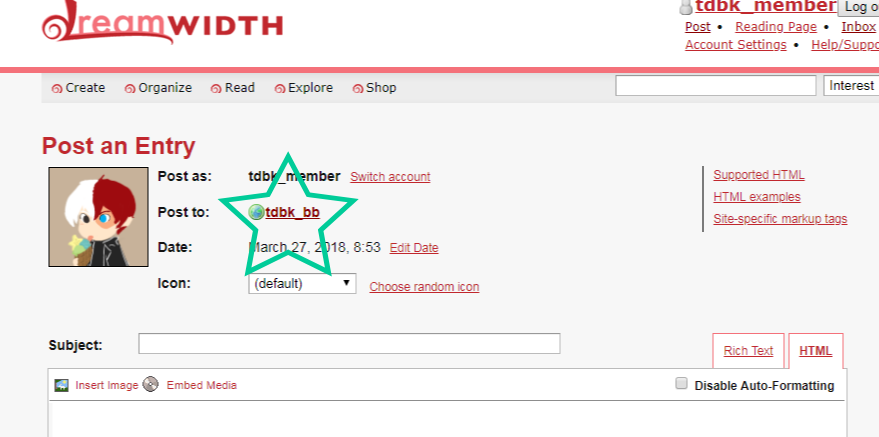
Step 3:
Create! Please be sure to include all the information needed for your post! If you would like to continue to edit, post as "Members" so you do not lose your entry. You may edit the entry at a later date if you wish. If you are satisfied with entry, then please leave the setting as "Everyone (Public)".
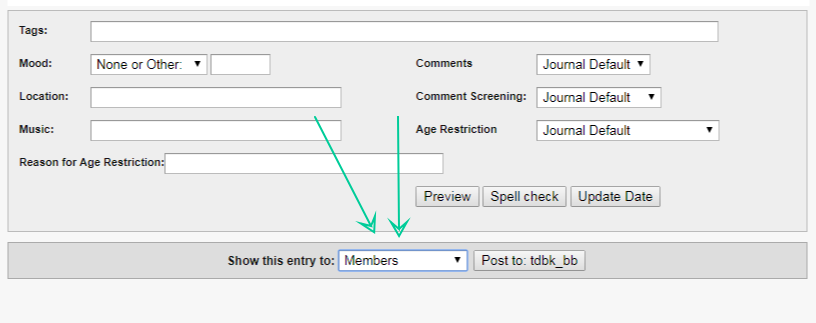
.
A masterpost is a single posting promoting your joint project. It will include links to the writer and artists respective posting sites, as well as include any visual representation of their project (banner, icon, thumbnail) that they wish to include.
IMPORTANT. You will need a dreamwidth account in order to post directly to the tdbk_bb community. If you do not have an account, please log in with the username and password provided in the update email.
We do not foresee any complications with multiple users accessing this account, however, please take these steps to ensure that you do not lose any progress on your entry.
The post will include the following:
Title:
Word Count:
Rating:
CW/Triggers:
Summary:
Creators Note:
Hyperlink to Artist post || Hyperlink to Writers post.
If you are posting as Anon, you will need to follow these steps in order to post to the community. Dreamwidth does not allow for multiple entries to save as a draft so please follow these steps to ensure that no progress is lost. Word Count:
Rating:
CW/Triggers:
Summary:
Creators Note:
Hyperlink to Artist post || Hyperlink to Writers post.
Step 1: Post to community! Click on the icon to post.
Step 2: Creating your Post! Please be sure you are posting to the right community!
Step 3:
Create! Please be sure to include all the information needed for your post! If you would like to continue to edit, post as "Members" so you do not lose your entry. You may edit the entry at a later date if you wish. If you are satisfied with entry, then please leave the setting as "Everyone (Public)".
.


